Your train, watched for you

Delays, platform changes and connection risk for today’s train, on nine networks across North America and Europe.

The board tells you what changed. Raily tells you what matters.

Delay Acela 2150 now 8 min late

Arrival moved to 11:34. Connection buffer is now 12 minutes.

  1. Know if you’ll connect

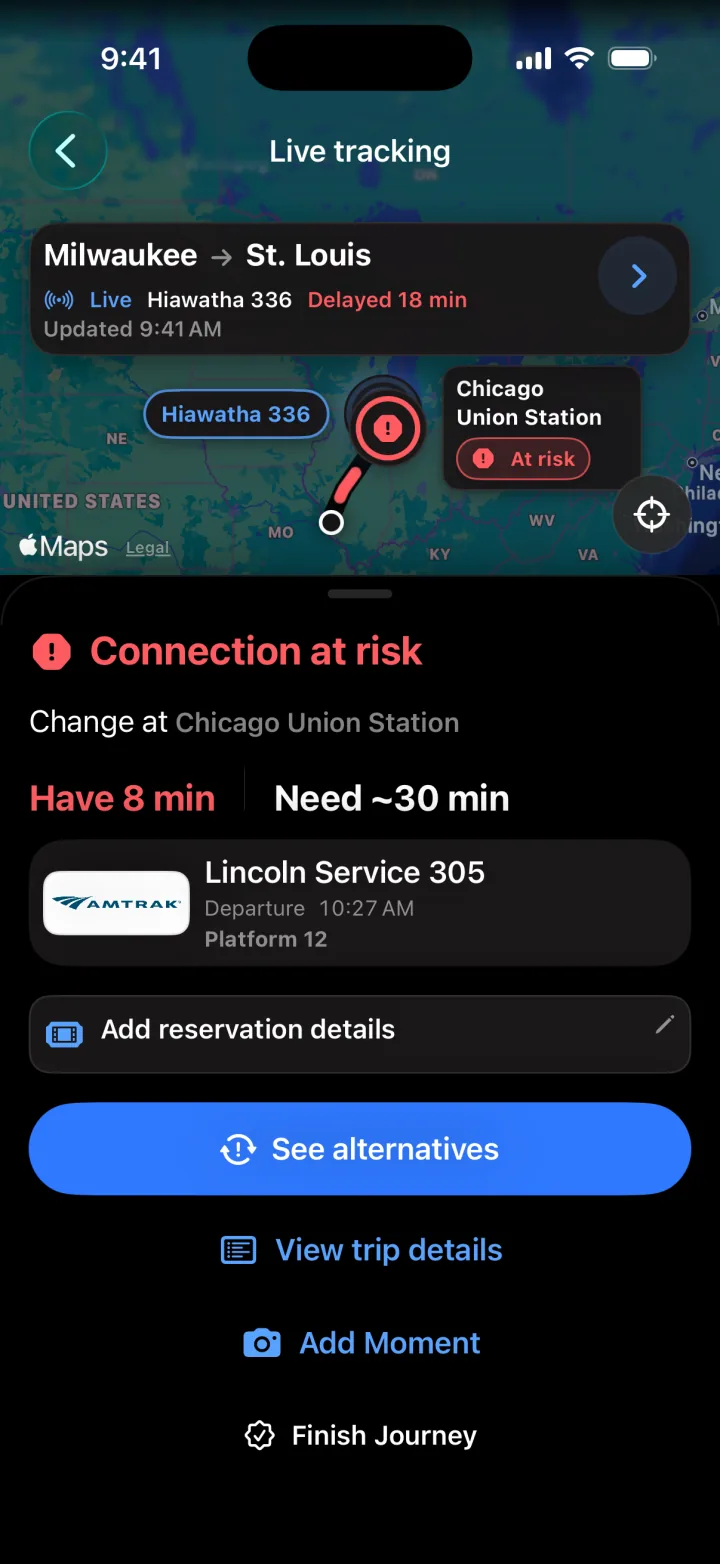
    Live position, delay and platform for your train, and a plain answer at the change: the minutes you have against the minutes you need.

    Live tracking of Hiawatha 336, delayed 18 minutes, with the connection at Chicago Union Station at risk: 8 minutes to change, about 30 needed
  2. Delayed? Here’s your next move

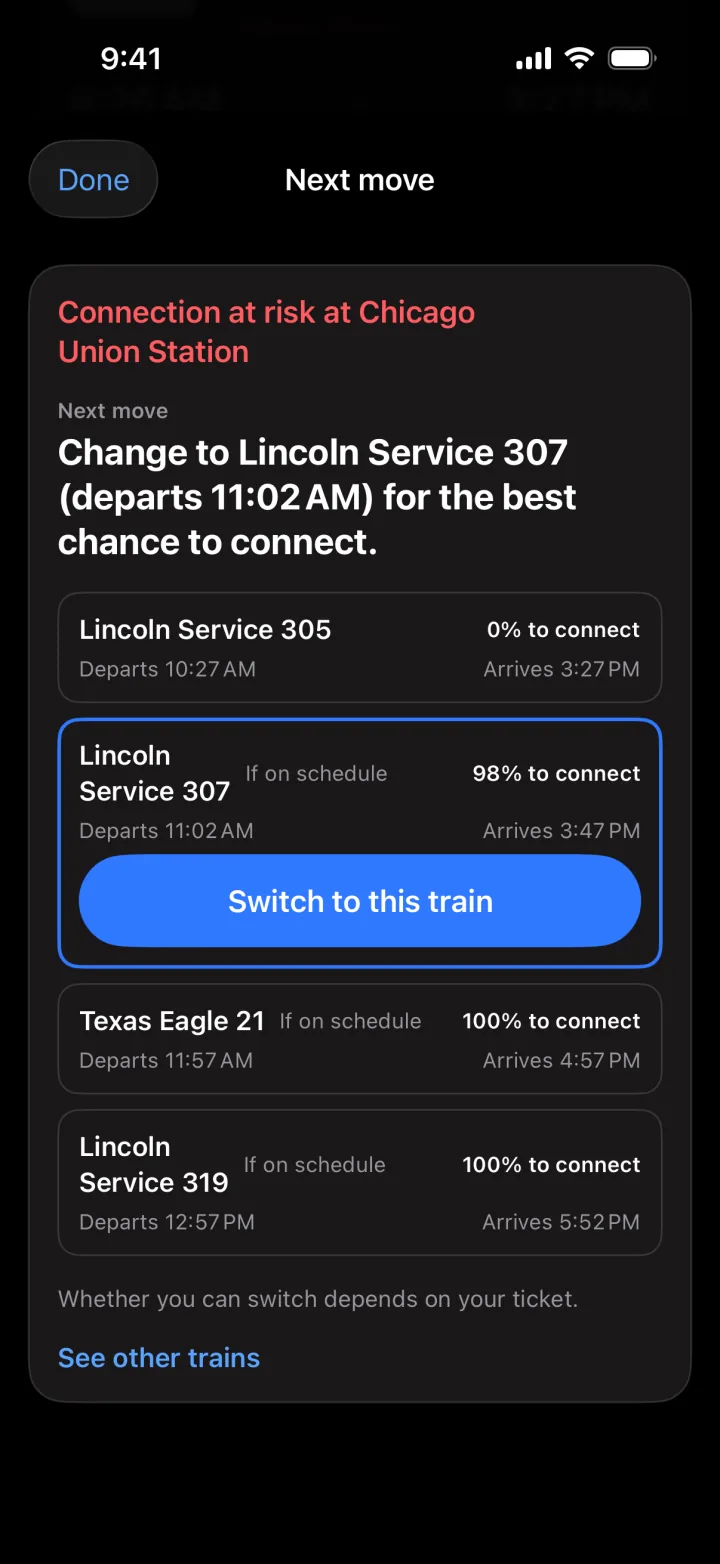
    When a delay breaks your connection, Raily compares the next trains by their chance to connect and points to the best one.

    Whether you can switch depends on your ticket.

    Next move for the connection at risk at Chicago Union Station: change to Lincoln Service 307, departing 11:02 AM, 98% to connect
  3. Every ride at a glance

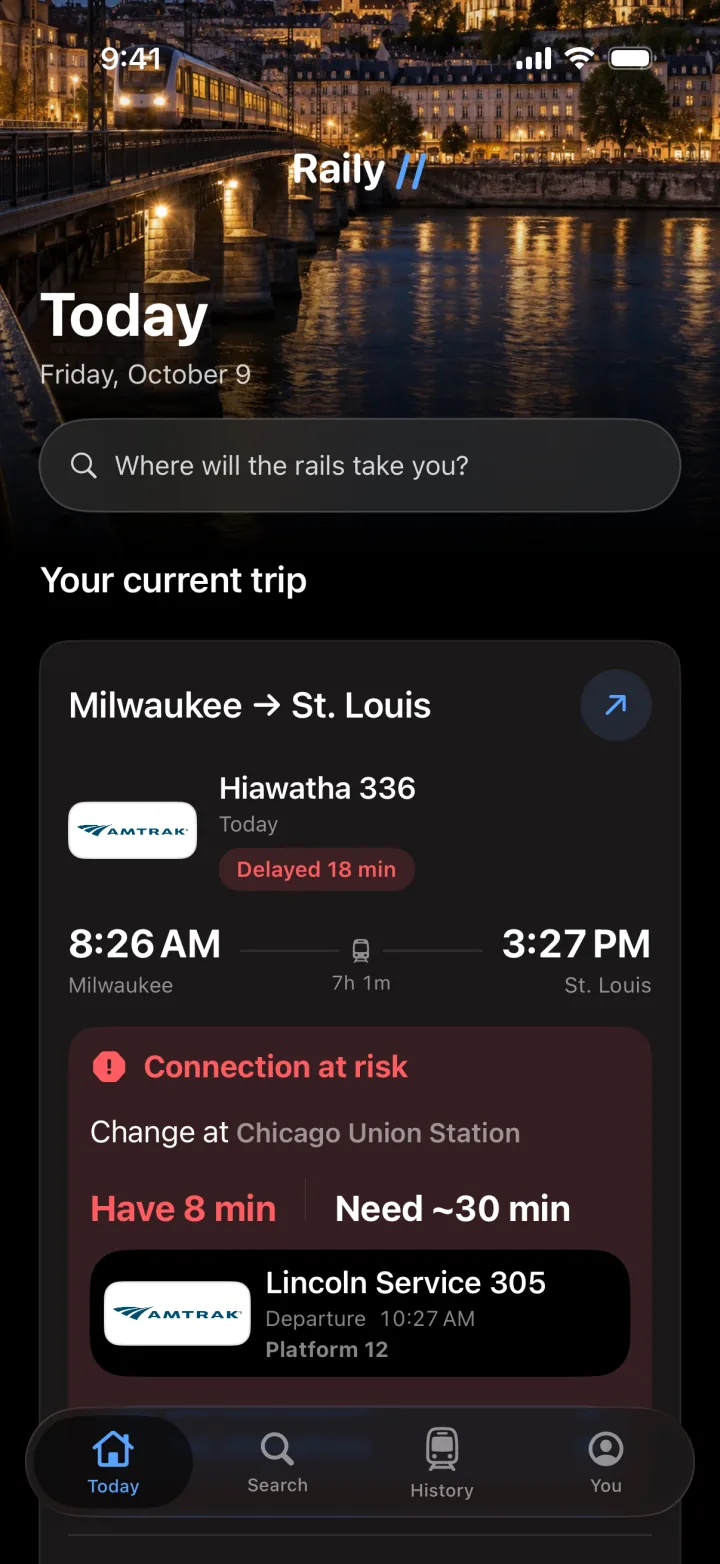
    Today’s train on one card: departure, arrival, delay and the change ahead, right where you open the app.

    Raily Today showing the current trip, Milwaukee to St. Louis on Hiawatha 336, delayed 18 minutes, with the connection at Chicago Union Station at risk
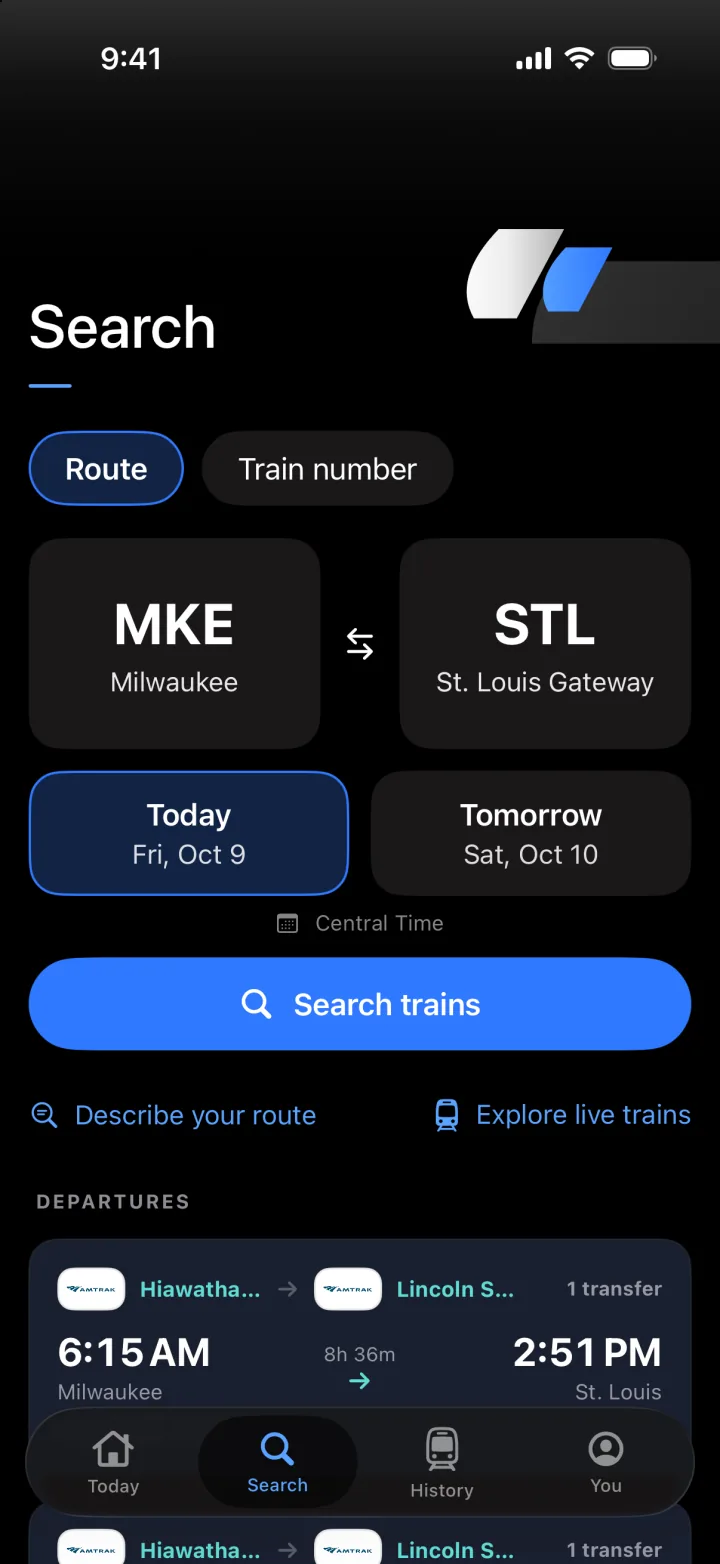
Search by route from Milwaukee to St. Louis Gateway for today, with the first departure a one-transfer trip on Hiawatha and Lincoln Service, 6:15 AM to 2:51 PM

Find your train in seconds

Search by route, date or train number on long-distance and high-speed rail. Every service is labeled live or schedule-only.

North America

  1. AmtrakUnited States, incl. Acela
  2. VIA RailCanada

Europe

  1. National RailUnited Kingdom
  2. Deutsche BahnGermany, incl. ICE
  3. SNCFFrance, incl. TGV
  4. SBBSwitzerland
  5. VyNorway
  6. NSNetherlands
  7. SJSweden

Everything frequent riders expect before, during, and after the trip.

Moments and Stories

Add a note or photo to any Journey, then read or share its Story.
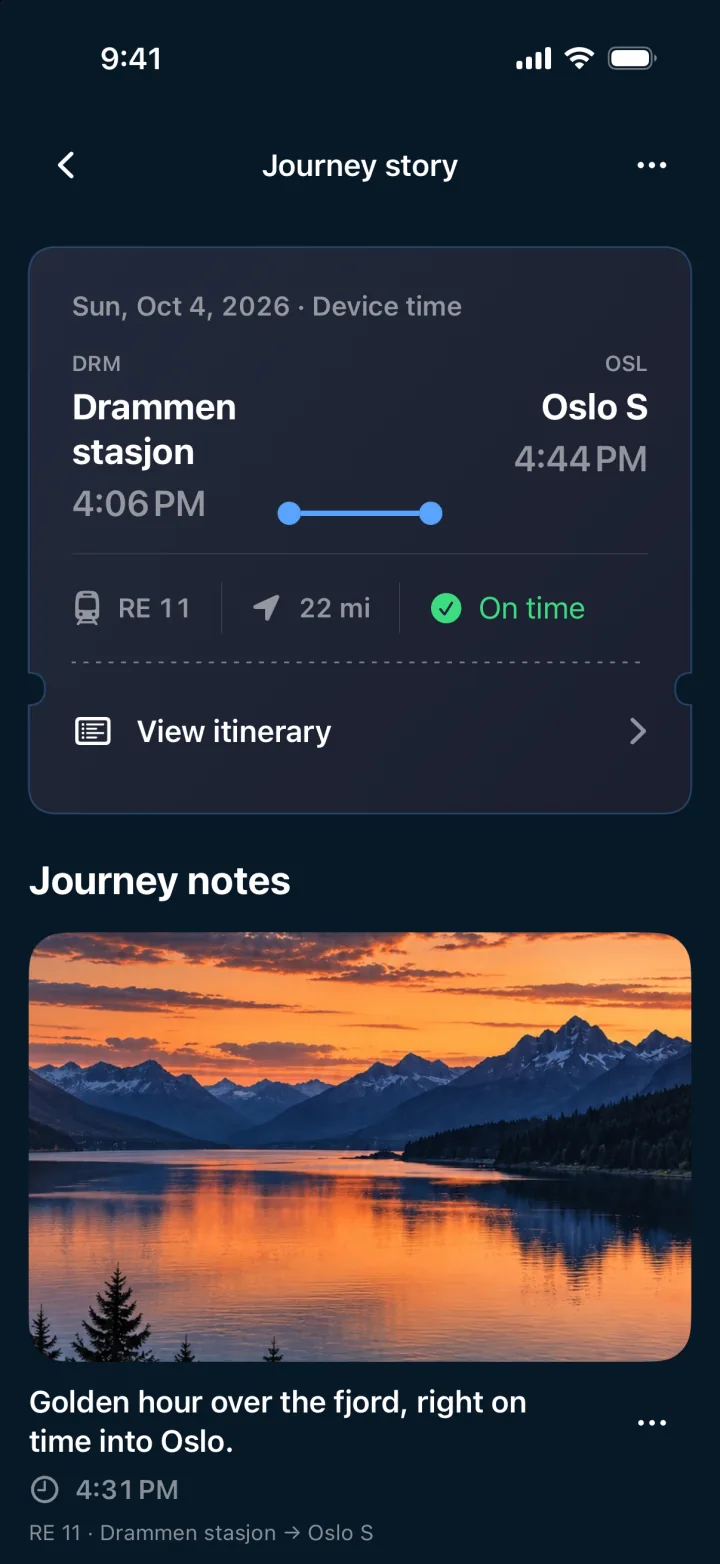
A Moment in the Journey story for RE 11 to Oslo S: a sunset photo over the fjord and a short note

A record of everywhere the rails took you

Completed Journeys become your travel history, free. Raily Pro adds Passport, Rail Year and Replay for the bigger picture.

Trips
46
Kilometers
18,420
Stations
63
Example totals, as shown in the You tab.

Multi-leg Journeys

Build, save and edit Journeys with several rail legs. Transfers, stops and times sit on one timeline.

A two-leg Journey from Milwaukee to St. Louis, changing at Chicago Union Station

Honest about the data

Every service says how fresh its information is, so you know what to trust.

  • Live
  • Schedule only
  • Stale
  • Offline

A reminder a week out

A free local reminder one week before departure. No subscription needed.

Raily Pro

Watching is free. Keeping watch is Pro

Search, plan and follow any Journey without paying. Raily Pro keeps watch over a saved Journey while you're away, and tells you when plans change.

Keep watch

  • Journey Guardian watches a saved Journey while you're away: delays, platform changes and connections
  • Platform-change, connection-risk and arrival alerts, pushed to you
  • Live Activities, home-screen widget and background alerts for every tracked Journey

Know before you board

  • On-time predictions for your train
  • Connection predictions, with success probability and backup trains for every transfer

Ask in plain words

  • Natural-language search: type where and when, and Raily plans the Journey
  • Travel answers about delays, platforms, arrival times and scheduled alternatives

Look back, together

  • Passport, Rail Year and Replay for your completed rail travel
  • Family sharing with up to five family members

Help when the schedule gets complicated.

Questions about coverage, notifications, subscriptions, or privacy are covered here. For anything else, send us a message.

Which trains does Raily support?

Raily focuses on high-speed and long-distance services across 9 networks: Amtrak including Acela (US), VIA Rail (Canada), UK National Rail, Deutsche Bahn including ICE (Germany), SNCF including TGV (France), SBB (Switzerland), Vy (Norway), NS (Netherlands), and SJ (Sweden). Coverage keeps expanding as reliable rail data feeds become available.

What can I do for free?

Search by route, date or train number; build, save and edit multi-leg Journeys; see live status, position, stops and platforms while the app is open; add Moments and read or share Stories; and get a free reminder one week before departure.

I'm not receiving notifications. What should I do?

Background alerts for a saved Journey are part of Raily Pro. If you're subscribed, make sure notifications are allowed in Settings > Notifications > Raily and switched on in the You tab, that tracking is on for the Journey, and that you have an internet connection.

Why is live position or delay data missing for my train?

Live data depends on the rail operator's public feed. When an operator's real-time feed is temporarily unavailable, Raily falls back to the scheduled timetable and labels the service as schedule-only, stale or offline, so you can tell how fresh the information is.

What is included in Raily Pro?

Raily Pro adds Journey Guardian (Raily keeps watching a saved Journey while you're away), on-time and connection predictions with backup trains, advanced notifications, natural-language search, travel answers, Passport, Rail Year and Replay, family sharing with up to five family members, and Live Activities, the home-screen widget and background alerts for tracked Journeys. Pro is $2.99/week, $5.99/month or $39.99/year. It is an auto-renewing subscription; you can manage or cancel it anytime in Settings > Apple Account > Subscriptions on your device.

How do I cancel my subscription or get a refund?

Subscriptions are billed through Apple. Manage or cancel in Settings > [your name] > Subscriptions. Refunds are handled by Apple at reportaproblem.apple.com.

How do I delete my data?

Journeys and Moments can be deleted in the app. Signing out alone does not delete them. Deleting the app removes its local data, but not any backup files you exported. See the Privacy Policy below for details.

Does Raily track my location?

No. Raily doesn't ask for access to your location; the map shows the train's position from the rail data feed. A place you type into a Moment stays on your device. Raily has no ads and doesn't track you across other apps; the product analytics it does collect are described in the Privacy Policy below.

Ask us anything

Tell us what's going on and we'll get back to you, usually within 1-2 business days.

Privacy

Private by design, useful by choice.

Raily is built for travel confidence without ad tracking or unnecessary identity collection.

Last updated: 2026-10-10

Information We Collect

Raily ("the App") does not collect personally identifying information (such as your name or email) on our servers. However, to deliver background notifications (delay, platform-change and arrival alerts), the App sends the limited data below to the Raily backend. We also collect the product analytics described below to improve the app. This data is not linked to your identity for advertising and is never used for cross-app advertising tracking.

  • Device identifier (APNs device token): sent and stored as the destination for push notifications.
  • Tracked-train information (train ID, train number, route, boarding and alighting stations, the device’s display language, and the next train of the same journey): for trips you choose to track, sent and stored to monitor status and send you alerts, including the disruption “next move”.
  • Journeys, travel history, reservation details, photos and notes: stored on your device in SwiftData. Booking references, coach and seat values you enter, photo contents, note text and recorded locations are not sent to our backend, analytics, notifications, iPhone widgets or Live Activities.
  • Apple Watch companion: saved train segments, boarding and alighting stations, times, service status, connection information, coach and seat values sync to your paired Apple Watch through Watch Connectivity. Booking references, photos, notes and account information are excluded. The Watch stores the latest snapshot for offline reading and shares it locally with the app’s Watch widgets. Coach and seat values are not displayed by Watch widgets. Changes and deletions on iPhone reach the Watch on the next successful sync; the last saved snapshot remains while disconnected.
  • Manual backups: you can export a JSON file containing journeys, saved trains, booking references, coach and seat values, photos, notes and recorded locations to a location you choose in Files. Account information, purchases and push tokens are excluded. This is not automatic sync. If you choose iCloud Drive or another provider, that service stores the file. You control deletion of exported files.
  • Product analytics: a per-install identifier, event time, app version and interaction events such as search, save, journey start/completion, Moment creation, story viewing and purchase are sent to our backend. Journey start/completion, Moment creation and reliving events contain no journey IDs, station names, locations, photos or note text. Failed saves do not emit success events.
  • Sign in with Apple: if you sign in, your name and email are stored only in the device UserDefaults; the Apple user ID is stored in Keychain. A derived account identifier is sent to RevenueCat to link purchases. Apple lets you hide your email via its private relay.
  • Pro check (disruption “next move”): to decide whether to show a recommendation, the App sends our backend its RevenueCat customer identifier and the train IDs of the first journey watched for free. The backend asks RevenueCat for the purchase status with that identifier. The first journey is stored with the identifier and train IDs, together with a short, non-reversible hash of the connecting IP address and the date to prevent abuse (the IP address itself is not stored).
  • App integrity check (App Attest): to confirm that requests to our backend come from the genuine Raily app and to prevent abuse of our API, the App uses Apple’s App Attest. iOS creates a key for this app in the device’s Secure Enclave, and Apple’s servers certify it. The private key never leaves the device and cannot be read by us. When the key is created, the App sends our backend the key identifier and the Apple-issued certificate (which contains the public key); after that, it attaches a signature made with this key, the key identifier and the device’s clock to some requests. The backend stores the key identifier, the public key, a signature count, how the App was installed (such as App Store or TestFlight) and its version when the device reports them, and when the key was registered and last used. This record is not stored together with your device token or account.
  • Advertising tracking: this data is not used for advertising or tracking across other companies' apps and websites.

Train Data

To show schedules and live delays, the App sends search queries (e.g. train numbers) to the Raily backend or public rail-data providers. These requests contain no personally identifying information.

Data Deletion

Journeys, reservation details and Moments can be deleted in the App. Signing out alone does not delete journeys, reservation details, photos or notes. Deleting the App removes its local data, but does not delete exported backups. Pending notification data expires after at most 15 minutes and is removed by the monitor. Server-side automatic retention for analytics events is not configured in the current implementation. App Attest keys stop working after the App is reinstalled, the device is migrated, or it is restored from a backup. Server-side automatic retention for App Attest key records is not configured in the current implementation either.

Children's Privacy

The App does not knowingly collect personal information from children under 13.

Contact

Questions? Reach us through the contact form above.